
[Bug] White Flash on iOS When Transitioning from Launch Screen to Application.Current.MainPage
#8,073 opened on Oct 17, 2019
Repository metrics
- Stars
- (5,644 stars)
- PR merge metrics
- (No merged PRs in 30d)
Description
Description
On iOS, when the app transitions from the Launch Screen to Application.Current.MainPage (i.e. when LoadApplication(new App()) runs), the app flashes white.
I think I've narrowed it down to PlatformRenderer.ViewWillAppear where Xamarin.Forms sets View.BackgroundColor = UIColor.White:
https://github.com/xamarin/Xamarin.Forms/blob/98b9f7d6bab9265c8ca0fd8e47e8899b85d7f609/Xamarin.Forms.Platform.iOS/PlatformRenderer.cs#L85
If it is required to set View.BackgroundColor, these may be better options:
UIColor.SystemBackgroundColor- New API on iOS13
- Will use
UIColor.Whitewhen Dark Appearance Disabled - Will use
UIColor.Blackwhen Dark Appearance Enabled
Application.Current.MainPage.BackgroundColor.ToUIColor()- Uses the color of the app's MainPage
I've created a reproduction sample here: https://github.com/brminnick/DarkModeSplashScreen
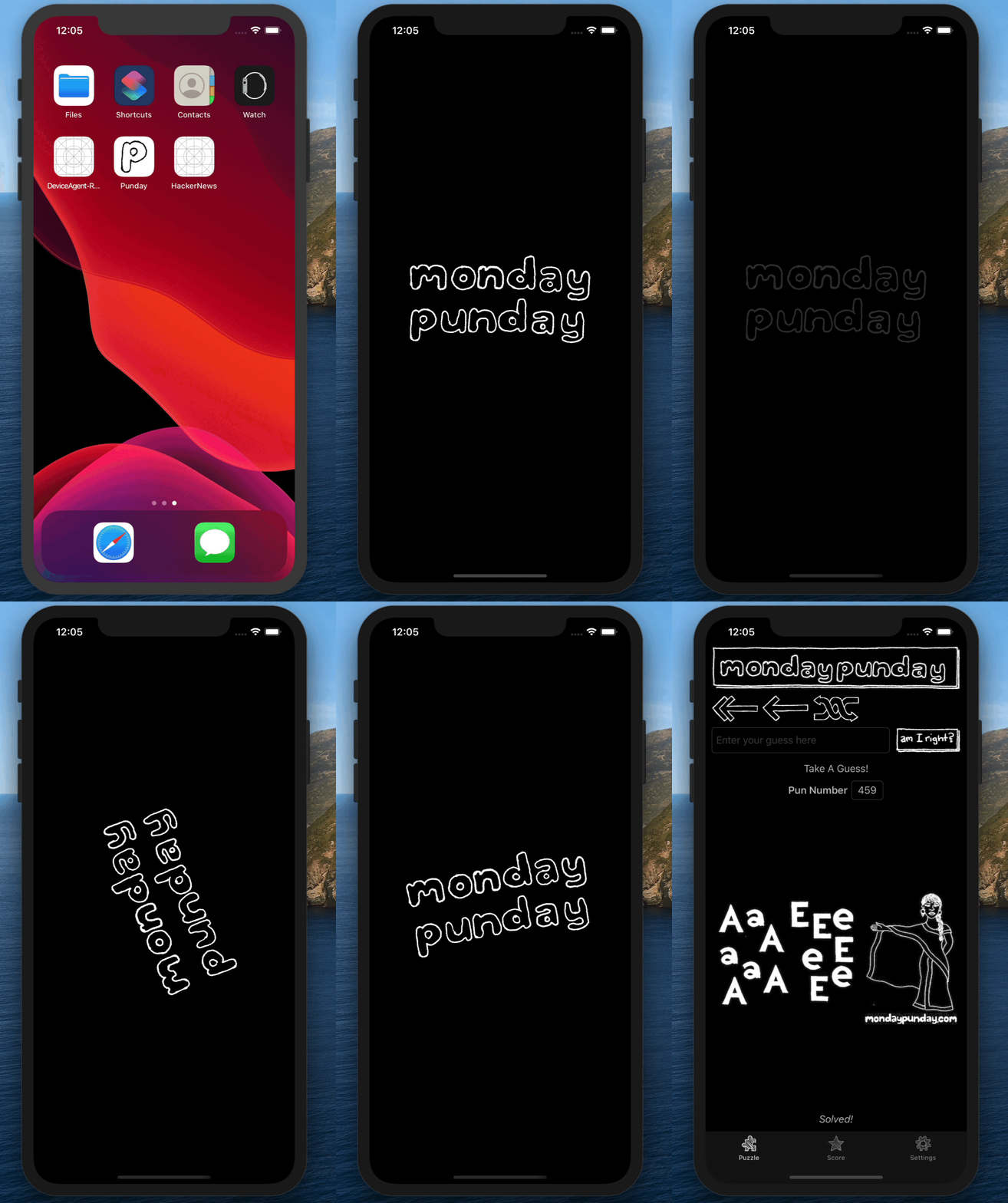
Steps to Reproduce
- Download/Clone the reproduction sample: https://github.com/brminnick/DarkModeSplashScreen
- In Visual Studio, open DarkModeSplashScreen.sln
- In Visual Studio, set DarkModeSplashScreen.iOS as the Startup Project
- In Visual Studio, Build/Deploy DarkModeSplashScreen.iOS to an iOS 13 emulator or device
- Force-close the app
- On the iOS 13 emulator/device open the Settings app
- In the Settings app, select Developer
- In the Developer Settings enable Dark Appearance
- In Visual Studio, Build/Deploy DarkModeSplashScreen.iOS the same emulator/device
- While the app is launching, notice the white flash after the Launch Screen is dismissed
Expected Behavior
No white flash should happen when transitioning from the Launch Screen to Application.Current.MainPage.
Actual Behavior
No white flash should happen when transitioning from the Launch Screen to Application.Current.MainPage.
Basic Information
- Version with issue: Confirmed on Xamarin.Forms v4.2.0848062 & v4.3.0.851321-pre3
- Last known good version: Unknown.
View.BackgroundColor = UIColor.Whitewas added in v1.2.0 - Platform Target Frameworks:
- iOS:
Screenshots
https://github.com/brminnick/Videos/blob/master/DarkModeSplashScreen/LaunchVideo.gif?raw=true
Reproduction Link
https://github.com/brminnick/DarkModeSplashScreen
Environment
=== Visual Studio Enterprise 2019 for Mac ===
Version 8.3.4 (build 8) Installation UUID: 80ff7ebc-b47d-4d51-98cc-e49b7b5e3b62 GTK+ 2.24.23 (Raleigh theme) Xamarin.Mac 5.16.1.24 (d16-3 / 08809f5b)
Package version: 604000208
=== Mono Framework MDK ===
Runtime: Mono 6.4.0.208 (2019-06/07c23f2ca43) (64-bit) Package version: 604000208
=== NuGet ===
Version: 5.3.0.6192
=== .NET Core SDK ===
SDK: /usr/local/share/dotnet/sdk/3.0.100/Sdks SDK Versions: 3.0.100 3.0.100-rc1-014190 3.0.100-preview9-014004 3.0.100-preview8-013656 3.0.100-preview7-012821 3.0.100-preview6-012264 2.2.402 2.1.701 2.1.700 1.1.14 MSBuild SDKs: /Library/Frameworks/Mono.framework/Versions/6.4.0/lib/mono/msbuild/Current/bin/Sdks
=== .NET Core Runtime ===
Runtime: /usr/local/share/dotnet/dotnet Runtime Versions: 3.0.0 3.0.0-rc1-19456-20 3.0.0-preview9-19423-09 3.0.0-preview7-27912-14 3.0.0-preview6-27804-01 2.2.7 2.1.13 2.1.12 2.1.11 1.1.13 1.0.16
=== Xamarin.Profiler ===
Version: 1.6.12.29 Location: /Applications/Xamarin Profiler.app/Contents/MacOS/Xamarin Profiler
=== Updater ===
Version: 11
=== Apple Developer Tools ===
Xcode 11.1 (15405) Build 11A1027
=== Xamarin.Mac ===
Xamarin.Mac not installed. Can't find /Library/Frameworks/Xamarin.Mac.framework/Versions/Current/Version.
=== Xamarin.iOS ===
Version: 13.4.0.2 (Visual Studio Enterprise) Hash: e37549bc Branch: xcode11.1 Build date: 2019-10-07 22:43:23-0400
=== Xamarin.Android ===
Version: 10.0.3.0 (Visual Studio Enterprise) Commit: xamarin-android/d16-3/4d45b41 Android SDK: /Users/bramin/Library/Developer/Xamarin/android-sdk-macosx Supported Android versions: None installed
SDK Tools Version: 26.1.1 SDK Platform Tools Version: 29.0.3 SDK Build Tools Version: 28.0.3
Build Information: Mono: mono/mono/2019-06@5608fe0abb3 Java.Interop: xamarin/java.interop/d16-3@5836f58 LibZipSharp: grendello/LibZipSharp/d16-3@71f4a94 LibZip: nih-at/libzip/rel-1-5-1@b95cf3fd ProGuard: xamarin/proguard/master@905836d SQLite: xamarin/sqlite/3.27.1@8212a2d Xamarin.Android Tools: xamarin/xamarin-android-tools/d16-3@cb41333
=== Microsoft Mobile OpenJDK ===
Java SDK: /Users/bramin/Library/Developer/Xamarin/jdk/microsoft_dist_openjdk_1.8.0.25 1.8.0-25 Android Designer EPL code available here: https://github.com/xamarin/AndroidDesigner.EPL
=== Android SDK Manager ===
Version: 1.4.0.65 Hash: c33b107 Branch: remotes/origin/d16-3 Build date: 2019-10-08 23:36:20 UTC
=== Android Device Manager ===
Version: 1.2.0.116 Hash: d2b2af0 Branch: remotes/origin/d16-3 Build date: 2019-10-08 23:36:44 UTC
=== Xamarin Designer ===
Version: 16.3.0.247 Hash: 52eac1a9e Branch: remotes/origin/d16-3 Build date: 2019-10-03 23:04:28 UTC
=== Xamarin Inspector ===
Version: 1.4.3 Hash: db27525 Branch: 1.4-release Build date: Mon, 09 Jul 2018 21:20:18 GMT Client compatibility: 1
=== Build Information ===
Release ID: 803040008 Git revision: 8da5857bc3d33e5667cacaab3bd1ab55375ed3e3 Build date: 2019-10-14 18:26:13+00 Build branch: release-8.3 Xamarin extensions: 61c91e660a01512a3b8187c749fd3bccc75a2bf4
=== Operating System ===
Mac OS X 10.15.0 Darwin 19.0.0 Darwin Kernel Version 19.0.0 Wed Sep 25 20:18:50 PDT 2019 root:xnu-6153.11.26~2/RELEASE_X86_64 x86_64