
xamarin/Xamarin.Forms
[Bug] Setting ColumnDefinition.Width on Grid causes row *height* to change
Open
#7,025 opened on Jul 30, 2019
a/layoute/7 :clock7:help wantedt/bug :bug:up-for-grabs
Repository metrics
- Stars
- (5,644 stars)
- PR merge metrics
- (No merged PRs in 30d)
Description
Description
I added an explicit Width to my Grid's ColumnDefinition items and it affected the height of the rows - it made them super short and not large enough for their contents.
I found these similar issues but they don't sound the exact same (or don't have enough info):
- #2137 GridCalc is calculating incorrect height on items with column spanning
- #6193 [Bug] Grid with ColumnDefinitions with Unexpected Behavior
Steps to Reproduce
- My XAML first looked like this:
        <Grid Padding="3" BackgroundColor="AliceBlue">
            <Grid.RowDefinitions>
                <RowDefinition></RowDefinition>
                <RowDefinition></RowDefinition>
            </Grid.RowDefinitions>
            <Grid.ColumnDefinitions>
                <ColumnDefinition></ColumnDefinition>
                <ColumnDefinition></ColumnDefinition>
                <ColumnDefinition></ColumnDefinition>
            </Grid.ColumnDefinitions>

            <Label Grid.Row="0" Grid.Column="0" BackgroundColor="Purple" TextColor="White" Text="Items in source: "></Label>
            <Label Grid.Row="0" Grid.Column="1" BackgroundColor="Purple" TextColor="White" Text="{Binding ItemCountInSource}"></Label>

            <Label Grid.Row="1" Grid.Column="0" BackgroundColor="Purple" TextColor="White" Text="Items in view: "></Label>
            <Label Grid.Row="1" Grid.Column="1" BackgroundColor="Purple" TextColor="White" Text="{Binding ItemCountInView}"></Label>

            <ActivityIndicator Grid.Row="0" Grid.Column="2" Grid.RowSpan="2" Color="Gray" IsRunning="{Binding IsBusy}"></ActivityIndicator>
        </Grid>
- And rendered like this, with nice, proper-height rows:
- Then I added some
Widthvalues:
        <Grid Padding="3" BackgroundColor="AliceBlue">
            <Grid.RowDefinitions>
                <RowDefinition></RowDefinition>
                <RowDefinition></RowDefinition>
            </Grid.RowDefinitions>
            <Grid.ColumnDefinitions>
                <ColumnDefinition Width="3*"></ColumnDefinition>
                <ColumnDefinition Width="1*"></ColumnDefinition>
                <ColumnDefinition></ColumnDefinition>
            </Grid.ColumnDefinitions>

            <Label Grid.Row="0" Grid.Column="0" BackgroundColor="Purple" TextColor="White" Text="Items in source: "></Label>
            <Label Grid.Row="0" Grid.Column="1" BackgroundColor="Purple" TextColor="White" Text="{Binding ItemCountInSource}"></Label>

            <Label Grid.Row="1" Grid.Column="0" BackgroundColor="Purple" TextColor="White" Text="Items in view: "></Label>
            <Label Grid.Row="1" Grid.Column="1" BackgroundColor="Purple" TextColor="White" Text="{Binding ItemCountInView}"></Label>

            <ActivityIndicator Grid.Row="0" Grid.Column="2" Grid.RowSpan="2" Color="Gray" IsRunning="{Binding IsBusy}"></ActivityIndicator>
        </Grid>
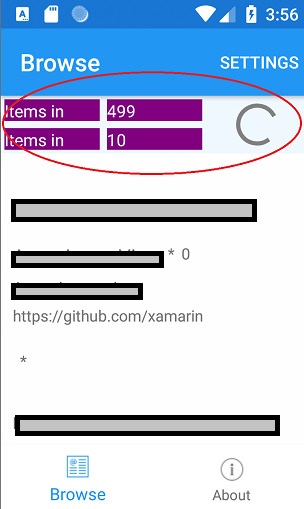
- And it rendered like this, with squished rows:

I expected it to affect only the width of the columns and not the heights at all.
I could only make it have a decent row height by setting explicit (not * relative) values:
                <RowDefinition Height="21"></RowDefinition>
                <RowDefinition Height="21"></RowDefinition>
Basic Information
- Version with issue:
- Repros with latest public RTM on NuGet.org:
    <PackageReference Include="Xamarin.Forms" Version="4.1.0.618606" />
    <PackageReference Include="Xamarin.Essentials" Version="1.2.0" />
- And also repros with latest public preview on NuGet.org:
    <PackageReference Include="Xamarin.Forms" Version="4.2.0.618605-pre2" />
    <PackageReference Include="Xamarin.Essentials" Version="1.3.0-pre" />
- Last known good version: Unknown
- IDE: VS 2019 Preview
- Platform Target Frameworks:
- Android: x86 Oreo Emulator on Win10
Reproduction Link
Repro app commit where I added the "broken" grid: https://github.com/Eilon/XamarinGitHubViewer/commit/002b747c89faaaa8cfa81a28b6ce1f4e47f771cb
(To use the app you need to create a GitHub PAT to execute the GraphQL query, so it's a bit tricky to run, but I'm happy to help.)