
[Bug] There is no smart hint in VS by the extension tag defined by IMarkupExtension.
#6,678 opened on Jun 27, 2019
Repository metrics
- Stars
- (5,644 stars)
- PR merge metrics
- (No merged PRs in 30d)
Description
Description
I want to create a style you can apply multiple tags simultaneously (as in HTML using CSS like), I defined, can be used normally, but not smart tips in VS, unlike StaticResource as when you are prompted to press the space available Style Key
我想创建一个可以同时应用多个样式的标记(像HTML中使用CSS那样),我定义完成后,可以正常使用,但是在VS中没有智能提示,不像StaticResource那样在按空格时会提示可用的Style Key
Steps to Reproduce
- create markup `cs
using MutliStyleDemo.Code; using System; using System.Linq; using System.Reflection; using System.Xml; using Xamarin.Forms; using Xamarin.Forms.Xaml; using XamlParseException = MutliStyleDemo.Code.XamlParseException;
namespace MutliStyleDemo { [ContentProperty("Key")] public class MultiStyleExtension :IMarkupExtension { public string Key { get; set; } private string[] resourceKeys; public object ProvideValue(IServiceProvider serviceProvider) { this.resourceKeys = Key.Split(new char[] { ' ' }, StringSplitOptions.RemoveEmptyEntries); Style resultStyle = new StaticResourceExtension() { Key = resourceKeys[0] }.ProvideValue(serviceProvider) as Style;
        for (int i = 1; i < resourceKeys.Length; i++)
        {
            var currentResourceKey = resourceKeys[i];
            Style currentStyle = new StaticResourceExtension() { Key = currentResourceKey }.ProvideValue(serviceProvider) as Style;

            if (currentStyle == null)
            {
                throw new InvalidOperationException("Could not find style with resource key " + currentResourceKey + ".");
            }

            resultStyle.Merge(currentStyle);

        }

        return resultStyle;
    }


}

public static class Extension
{
    public static void Merge(this Style style1, Style style2)
    {
        if (style1 == null)
        {
            throw new ArgumentNullException("style1");
        }
        if (style2 == null)
        {
            throw new ArgumentNullException("style2");
        }

        if (style2.BasedOn != null)
        {
            Merge(style1, style2.BasedOn);
        }

        foreach (var currentSetter in style2.Setters)
        {
            style1.Setters.Add(currentSetter);
        }

        foreach (TriggerBase currentTrigger in style2.Triggers)
        {
            style1.Triggers.Add(currentTrigger);
        }
    }
}
}
2. xaml
<ContentPage.Resources>
    <Style TargetType="Label" x:Key="s2">
        <Setter Property="FontSize" Value="20"/>
    </Style>

    <Style TargetType="Label" x:Key="s3">
        <Setter Property="FontAttributes" Value="Italic"/>
    </Style>

</ContentPage.Resources>


<StackLayout>
    <Label Text="Welcome to Xamarin.Forms!"   Style="{local:MultiStyle s1 s2 }"
       HorizontalOptions="Center"
       VerticalOptions="CenterAndExpand" />

    <Label Text="Welcome to Xamarin.Forms!"  Style="{StaticResource s2 }"
       HorizontalOptions="Center"
       VerticalOptions="CenterAndExpand" />
</StackLayout>
`
Expected Behavior
I hope that when I press the space, I will have a smart prompt, like the one below.
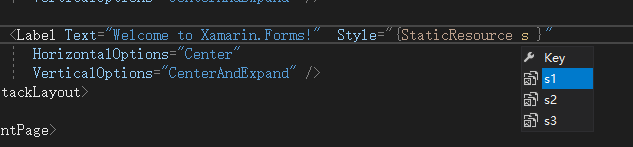
Actual Behavior
But when I use custom Markups, I don't have smart tips, No styles are listed,like the one below.

Basic Information
- Version with issue:
- Last known good version:
- IDE:VS2019 16.00
- Platform Target Frameworks:
XamarinForm - Nuget Packages:
- Affected Devices: