
Clipping issue in Xamarin.Forms.Android platforms (version 3.4 and above.)
#5,663 opened on Mar 22, 2019
Repository metrics
- Stars
- (5,644 stars)
- PR merge metrics
- (No merged PRs in 30d)
Description
Description
Hi Team,
We at Syncfusion developer community, data visualization controls for Xamarin and we have more than 90 controls spread across all platforms of Xamarin. Please refer the below link for a description about us. UserGuide: https://help.syncfusion.com/xamarin/sfdatagrid/overview FeatureTour: https://www.syncfusion.com/products/xamarin.
We would like to bring to your notice a bug that we encountered Xamarin.Forms 3.4.0.1008975 and above version. That is clipping issue in Forms android. It works fine in Forms.iOS and Forms.UWP . You can reproduce the issue with attached sample. it is working fine in Xamarin Forms version 3.1.0.697729.
Steps to Reproduce
- Run the attached sample.
- Scroll right to left horizontally
- See the second column text is overlap to the first column.
Expected Behavior
First column FrozenColumn, So first column is static in view while scrolling. when scroll the grid second column text does not over lapped to first column.
Actual Behavior
FrozenColumn text over lapped while scroll horizontally.
Basic Information
- Version with issue: 3.4.0.1008975
- Last known good version: 3.1.0.697729
- IDE:
- Platform Target Frameworks:
- iOS:
- Android:
- UWP:
- Android Support Library Version:
- Nuget Packages:
- Affected Devices:
Screenshots
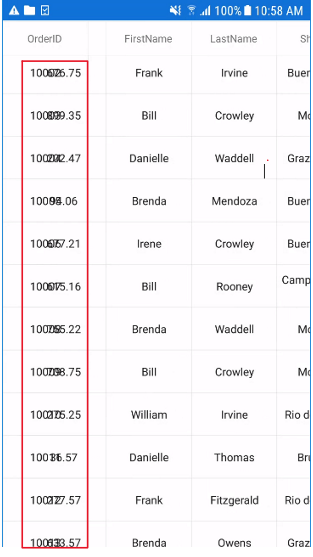
Videos: 3.1 version 3.1 version working video.zip
3.4 version 3.4 version issue reproducing video.zip
Reproduction Link
Reproduce sample DataGridDemo.zip